
Mega SoundBob lets you create multiple one click or touch image swap or switch windows with optional sound effects from one setup screen.
For example, you could create a simple teaching sound board for education, musical instruments such as drum machines and keyboards, or even custom Augmentative and Alternative Communication (AAC) implementations.
The versality of Mega SoundBob is what gives it strength. Simply load up with an image for frame 1, an image for frame 2, and a sound to play when interacted with (if you wish), then hit run, and you have a custom button!
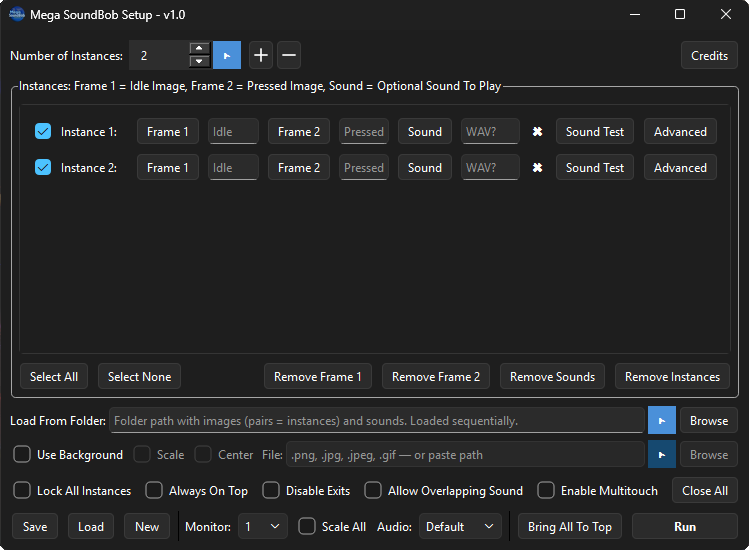
Further customisation options are also available within the Mega SoundBob application.
- Created windows can be moved on the fly with a simple click and drag.
- Configuration files can be saved and shared with others to play with.
- Backgrounds can be selected that will help frame your creations.
- You can set instances to be played or interacted with using a key on your keyboard.
- Created instances can be locked to prevent accidental moving.
- You can have the instances always on top. For example, if you use a full screen background, it will “hide” your windows environment, making Mega SoundBob creations take precedent over anything else.
- Autorun options are available, so one may set Mega SoundBob and your creations to be the first thing Windows loads.
- You can enable or disable overlapping sound. Helpful if you don’t want your end user to overstimulate and go a little crazy.
- If Multitouch is enabled, Windows devices with touch screen inputs can be used to great effect, perfect for people with a passion for creativity.
- Instance labels can be renamed so it is easier to keep track of what windows are being made. (Not available in Demo version)
- You can select all, or just some of the instances to play when the setup is run.
- Drag and Drop operations are available for both loading images into separate instances, or a folder to auto load files, or full Mega SoundBob configuration files.
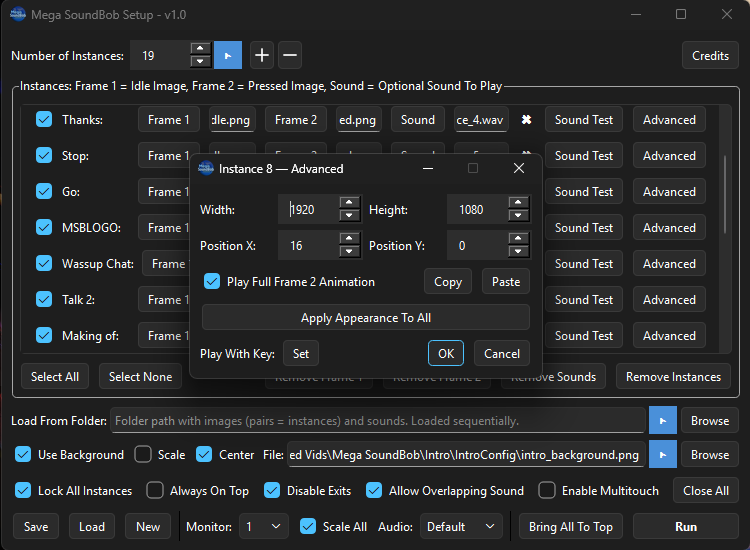
The program has been developed to allow for as much customisation as someone could ever want. Created instances can be edited in simple .json config files with a text editor of your choosing, and/or manipulated further in each instances Advanced Dialog box.
Download The Demo
Want to try Mega SoundBob with no commitment? Download the demo version here:
The Demo version has these limitations:
- Maximum 10 instance windows (full version allows 100).
- Single monitor only — no monitor selection dropdown.
- Cannot auto-set instance width/height from image dimensions when loading from a folder (you can still set size manually in Advanced).
- If you load a config that was saved with more than 10 instances, only the first 10 will be used.
- No ability to rename Instance labels in the list of instances.
Download and use of the Mega SoundBob Demo requires agreeing to its EULA, a copy of which can be read here:
Purchase The Full Version
Purchase and use of Mega SoundBob requires agreeing to its EULA, a copy of which can be read here:
While I am confident that no major bugs are present in these builds, some may remain. If you encounter any, please report them via the BL3I Discord.
Organisational Licenses
If you are an organisation and want to use the program for your business, or would like to run the program on a multi-user basis, please get in touch via email with [email protected].
If you are a registered charity organisation, please also get in touch using [email protected] to discuss how the program can be best suited for your needs.
Watch The YouTube Video
Interested in how I made this program? Want to learn more of its capabilities? Or want to see some fun creations made with Mega SoundBob? Watch the video below 🙂.
Like and Subscribe!
Download Custom Configs
Are you creative? Join the BL3I discord today to share your custom configurations, and the best ones will be shared here for others to download and use (with your permission). https://discord.gg/KB7Df3aS7p
- BL3I’s Super Cool Keyboard Program
Please note, the above configurations are to be used at your own risk, and have been shared with the assumed authors permission, including all assets they contain.
Third Party Licenses
Mega SoundBob uses the software developed and distributed by third parties. Their information and license agreements can be viewed here:
I thank those who created these software tools to allow me to create Mega SoundBob, and wish them the very best in all they wish to do.